
Linux Study Notes
Linux, formally known as GNU/Linux, is a Unix-like operating system that is free to use and freely distributed.
Linux
Using Vim
yy Copy the current line (copy 5 lines: 5yy)
dd Delete the current line (delete 5 lines: 5dd)
u Undo
p Paste
/text Search for the text "text" and highlight it
After pressing Enter to enter search mode, press n to find the next occurrence.
Shift + N Find the previous occurrence.
:nohl Clear highlighting.
:set nu / :set noun Show/hide line numbers
- gg/G / nG Quickly jump to the first line / last line / line n
System Operations
shutdown -h now		# 关机
halt 				# 关机
shutdown -h 1   	# 1分钟后关机
shutdown         	# 默认一分钟后关机
shutdown -r  now 	# 重启
reboot  			# 重启
sync			 	# 将内存中的数据写到硬盘,默认关机重启会执行
User Management
Concept of groups: Placing multiple users in the same group allows permissions to be managed for the group as a whole, making management more convenient.
When a user is not added to any group, the system creates a group with the same name as the user by default.
useradd usernameAdd a useruseradd -d directory_name usernameAdd a user and specify the user’s directoryuseradd -g group_name usernameCreate a user and add them to the specified grouppasswd usernameChange the password for the specified user. If no username is specified, the current user’s password is changed.su usernameSwitch to the specified usersu - usernameSwitch to the specified user (along with their environment)userdel usernameDelete a useruserdel -r usernameDelete the specified user and their leftover filesid usernameView information about the user (last login time and corresponding IP, groups the user belongs to, and user ID)who am iView the user who first logged in to the current sessiongroupadd group_nameAdd a groupgroupdel group_nameDelete an existing groupusermod -g group_name usernameAdd a user to a group
System Runlevels
- There are 7 runlevels:
- 0 Shutdown
- 1 Single-user mode, no network
- 2 Multi-user mode, no network
- 3 Multi-user mode with networking
- 4 Reserved by the system
- 5 Graphical interface
- 6 Reboot
- Single-user mode is commonly used to change the root password.
init 0Switch to system runlevel 0systemctl get-defaultGet the current runlevelsystemctl set-default graphical.targetSet the default runlevel to graphical modemulti-user.targetMulti-user runlevel with networking
File Operations
cdDirectory operationstouchCreate an empty filermdirDelete a directory; it must be empty for deletion to succeed.mkdirCreate a directory. The-poption indicates parent directories; it also creates parent directories if they do not exist.rmThe-roption recursively deletes directories. The-foption means “force” and does not prompt for confirmation.pwdDisplay the current pathcpCopy files or directories.\cpdoes not prompt before overwriting.cp -rcopies an entire directory recursively.mvMove/renametail -f filenameFollow a file and display updates; commonly used to view logs.moreScroll through file contentslessScroll through file contents without loading the entire file into memory; suitable for opening large files.catViewechoOutput.echo $environment_variable_nameoutputs the value of an environment variable.>Output redirection (overwrite);>>output redirection (append)historyCommand history.history 10displays the 10 most recent entries.dateDate:"+%Y-%m-%d %H:%M:%S"calCalendar.cal 2023displays the calendar for all of 2023.findSearch path; command for finding files.-namesearches by filename;-usersearches by owner;-sizesearches by file size (k,M,G).+and-indicate greater than and less than; without either, the size must match exactly.locateSearch by index. It is faster, but the index must be created in advance.updatedbupdates the index.whichView the location of a command
Permission Operations
File identifiers:
-file;ddirectory;ccharacter device (various hardware);bblock device (hard drive)
| Identifier | File | Directory |
|---|---|---|
| r (4) | Readable | Can view contents with ls |
| w (2) | Writable | Can modify the directory’s contents (delete or add files) |
| x (1) | Executable | Can enter the directory with cd |
chown user filenameChange the file owner.-rapplies recursively.chown user:group filenameChange the file owner and group
chgrp group_name filenameChange the file’s group.-rapplies recursively.chmod permissions filePermission syntaxuowner,gowning group,oothers,aall.chmod u=rwx,g=rx,o=rx fileu+wandu-wadd or remove permissions for the owner.chmod u+w file- Numeric permissions:
r=4,w=2,x=1.chmod 777 file
Scheduled Tasks
crontab -e Edit the task list
Task format: * * * * *
Representing, respectively: minute, hour, day, month, weekday
Example: */1 * * * * Run once every minute
Special characters: / means every; , and - specify ranges
at A one-time scheduled task
atrm number Delete a scheduled task
Disk Operations
lsblkList block device information. The-foption displays filesystem information.dfDisplay disk information and usage.-hdisplays it in a more readable format.duDisplay disk usage for files in a specified directory.-huses more readable units;--max-depth=1sets the subdirectory depth;-aincludes files.fdisk /dev/sdaOperate on and partition the specified block device.mkfsCreate a filesystemmountblock_device_partition mount_directory Mount a device outside the Linux system (temporary mount; lost on reboot)umountUnmount a device. You can specify either the device or the mount point.- For persistent mounts, edit
/etc/fstabto adjust the mount settings.
Networking in a VM
NAT mode: Shares an IP address with the host through NAT and creates a virtual gateway service. Both the host and the VM connect to this gateway. The virtual gateway acts as a proxy service, allowing all devices on the NAT subnet to access the real host’s network.
Bridged mode: Creates a virtual hub or switch that connects the VM directly to the real host’s network link. The VM is visible on the local network and uses an IP address from the real local network.
Host-only mode: The host and VM connect to each other through network adapters, but cannot access the internet.
To change the VM’s IP address, edit the configuration in vim /etc/sysconfig/network-scripts/ifcfg-network_adapter_name.
TYPE=Ethernet
PROXY_METHOD=none
BROWSER_ONLY=no
BOOTPROTO=static  //静态ip
IPADDR="192.168.6.100"  //ip地址
NETMASK="255.255.255.0"  //子网掩码
GATEWAY="192.168.6.1"  //网关
DNS1="192.168.6.1"   //dns
DEFROUTE=yes
IPV4_FAILURE_FATAL=no
IPV6INIT=yes
IPV6_AUTOCONF=yes
IPV6_DEFROUTE=yes
IPV6_FAILURE_FATAL=no
IPV6_ADDR_GEN_MODE=default
NAME=ens160
UUID=4ded5bf3-4709-4de5-a0eb-4eb41f04cd81
DEVICE=ens160
ONBOOT=yes  //开机时启用
Process-Related
topdisplays or manages running programs-idisplays only active processes-dspecifies the number of seconds between refreshes-pspecifies the ID of the process to monitor
psprocess status:-adisplays processes on all terminals;-udisplays processes by user;-xdisplays runtime parameters for background processes-
ps -aux -
ps -efdisplays all current processes in full format
-
kill 8888terminates the process with PID 8888-9forcefully terminates the process- Can force another user to log out; can temporarily disable remote login via
sshd
killallterminates processes and their child processespstree -updisplays currently running processes in a tree structurentsysvgraphically manages servicesnetstatchecks the system's network status-andisplays detailed information-ldisplays ports only
Firewall
netstat -anpchecks network status on a Linux system and can be used to troubleshoot port conflictsfirewall-cmd -permanent --add-port=port/protocolfirewall-cmd -permanent --remove-port=port/protocolfirewall-cmd --reloadreloads the firewall rulesfirewall-cmd -query-port=port/protocol
RPM Package Management Tool
rpm -qalists all packagesrpm -q namequeries the package namednamerpm -qiqueries package informationrpm -qllists the files in a packagerpm -qf file_pathqueries which package a file belongs torpm -ivh (rpm_file)installs the specified RPM filei— installv— verbose; displays messagesh— hash; displays a progress bar
Environment Variables
On Linux, environment variables are configured by modifying the
/etc/profilefile.
export JAVA_HOME=/......./
PATH=$JAVA_HOME/bin
- export is a true environment variable. Without export, it is a Bash variable, but adding a Bash variable to PATH has the same effect
- After making changes, run source /etc/profile to apply them
- Use echo $PATH to check whether it is configured correctly
- Do not put spaces around =, or an error will occur
Shell programming
- Specify the interpreter on the first line of the file
#!/bin/bash ''denotes a string#single-line comment:<<!!multiline comment, on a line by itself$reference a variableunsetdestroy a variablereadonlyread-only variable; cannot be destroyed- `` backticks denote a command
- Positional parameters Pass arguments when executing
- $n Get the nth positional parameter. If n is greater than 10, use ${10}
- $* All arguments, treated as a single unit
- $@ All arguments, treated individually; output is similar to $*
- $# Number of arguments
- Predefined variables
- $$ PID of the current script
- $! PID of the last process
- $? Exit status of the previous command; 0 means success
- Shell expressions
- `expr 1+1 `
- $(1+1)
- $[1+1]
- Conditional tests
Strings
- = Whether they are equal
Integers
- -lt Less than
- -le Less than or equal to
- -eq Equal to
- -gt Greater than
- -ge Greater than or equal to
- -ne Not equal to
Permissions
- -r Read
- -w Write
- -x Execute
File types
- -f File exists
- -e File or directory exists
- -d Directory exists
- Conditional statements
- if [ expression ] then execute statements fi Returns true if non-empty
- Example: [expression] && echo ok ||echo "not ok"
echo
The print command. Usage:
echo 			# 输出一个空行
echo hello 		# 输出hello并换行
echo -n hello 	# 输出hello

# 调用变量
name=zhangsan
echo $name
# 打印上一个程序的退出状态码
echo $? 		# 0是成功执行正常退出,非0就是有意外情况

# 查看上一条命令的执行详情
echo !!

# 查找某条命令的执行详情
echo !l			# 最近一条以l开头的命令
How to print special characters such as $
echo \$name
echo '$name'
Special case may be triggered on legacy Red Hat-family distributions
echo "hello world!"
# 报错,搜寻以”开头的命令找不到
-e option enables escaping.
echo -e "hello\nworld"
bash
A Linux command interpreter that executes user commands in a text window.
It works similarly to the Python interpreter.
Command-line expansion
Use {}. Example:
echo {1..100}
1 2 3 4 5 6 7 8 9 10 11 12 13 14 15 16 17 18 19 20 21 22 23 24 25 26 27 28 29 30 31 32 33 34 35 36 37 38 39 40 41 42 43 44 45 46 47 48 49 50 51 52 53 54 55 56 57 58 59 60 61 62 63 64 65 66 67 68 69 70 71 72 73 74 75 76 77 78 79 80 81 82 83 84 85 86 87 88 89 90 91 92 93 94 95 96 97 98 99 100
echo {a..z}
a b c d e f g h i j k l m n o p q r s t u v w x y z
Command Alias
alias 					# 展示全部别名
alias grep='grep --color=auto'
alias l='ls -CF'
alias la='ls -A'
alias ll='ls -l'
alias ls='ls --color=auto'

alias rm='rm -i'		# 新增命令别名
unalias rm				# 删除命令别名
Command History
history 		# 展示命令历史
!行号			#重复执行命令中的某一行
!! 			#重复执行上次命令
Bash Keyboard Shortcuts
ctrl + a 	# 光标到行首
ctrl + e 	# 光标到行首
ctrl + k 	# 删除后面的命令
ctrl + u 	# 删除前面的命令
ctrl + l 	# 清屏
Command Completion & File Path Completion
Press Tab to complete commands found in PATH, or file and directory paths.
RegExp Regular Expressions
Regular Expression: Regular Expressions
Use symbols to quickly filter, replace, and process the desired strings.
Characteristics:
- Regular expressions are a set of rules and methods.
- Regular expressions work line by line, processing one line at a time.
- In Linux, they are generally supported only by sed, grep, and awk.
The Linux Three Musketeers Three important Linux tools
- sed — text editor
- awk — text formatter
- grep — text filter
Categories of Regular Expressions (as classified among the Three Musketeers)
Basic Regular Expressions (BRE)
如 ^$.[]*Extended Regular Expression (ERE)
在BRE基础上新增了 (){}?+|等
Functions of Basic Regular Expressions:
- Match characters
- Match repetitions
- Anchor positions
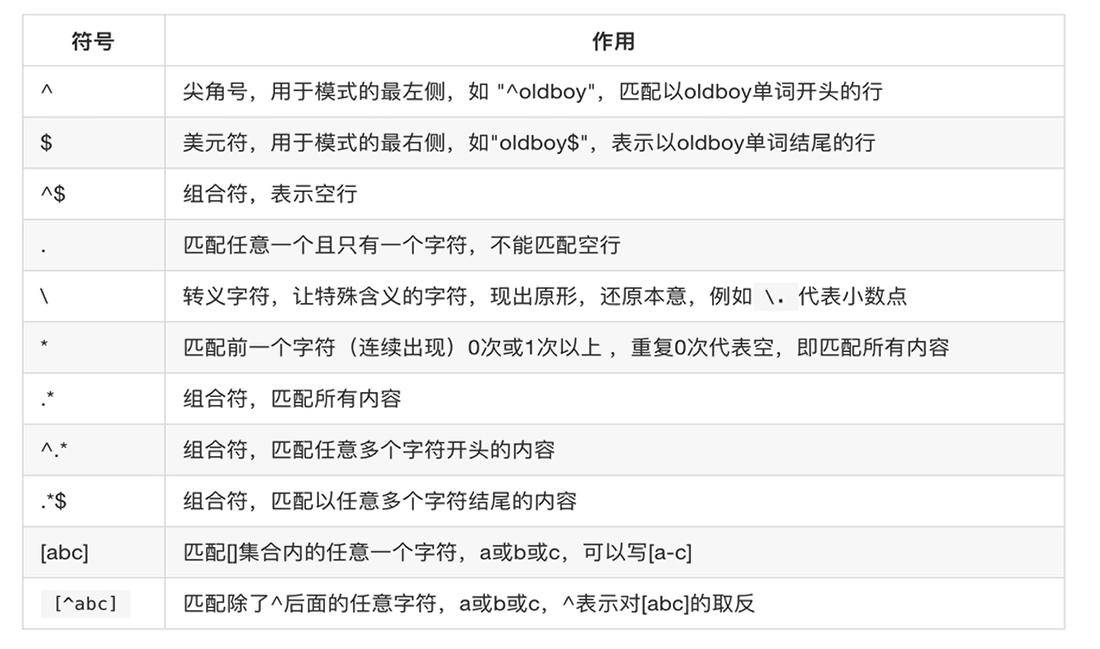
Basic Regular Expressions:
Extended expressions require grep -E (to enable extended mode).
| Character | Function |
|---|---|
| + | Match a character one or more times |
| [:/]+ | Match : or / one or more times |
| ? | Match a character zero or one time |
| | | Means “or” |
| ( ) | Grouping filter; the enclosed content is one unit |
| a{1,2} | Match a character 1–2 times |
| a{1,} | One or more times |
| a{1} | Once |
| a{,2} | 0–2 times |
sed (stream editor)
A stream editor; “stream” means that processing is performed one line at a time.
Usage:
sed -e(expression) file. Multiple-eparameters can be specified to execute multiple expressions.You can also write expressions to a file, then use the
-fparameter to read and execute the script in that file.
By default, it only prints the output. Use the -i parameter to write the changes to the file.
Use -ie to write the changes and back up the original file.
For text, the four common operations are:
- Add
- Delete
- Modify
- Query
Assume the contents of the file test are as follows.
1
2
3
4
5
Writing Expressions
[Line condition] Operation \ Content
If no line condition is specified, the operation applies to all lines.
Append Operation
a, append: add a new line after the specified line
sed -e '1a\new line' test
1
new line
2
3
4
5
i, insert: Insert a new line before the specified line.
sed -e '1i\new line' test
new line
1
2
3
4
5
Delete Operation
d, delete deletes the specified line
sed -e '1d' test'
2
3
4
5
Change Commands
c, change a line
sed -e '1c\test change line' test
test change line
1
2
3
4
5
s, replace one or more strings in the corresponding lines with the target string (most commonly used, and supports regular expressions)
Test content:
top line
a new line
new new line
Modify locally (replace at most one per line):
sed 's/new/old/' test
top line
a old line
old new line
Modify multiple (replace with however many there are):
sed 's/new/old/g' test
top line
a old line
old old line
Query Operations (Print)
p Output the corresponding line
sed '1p' test
top line
top line
a new line
new new line
During output, the output from p conflicts with the contents of sed’s default output buffer, causing duplicate output.
Use the -n option to disable buffer output and print only the lines we specify.
sed -n '1p' test
top line
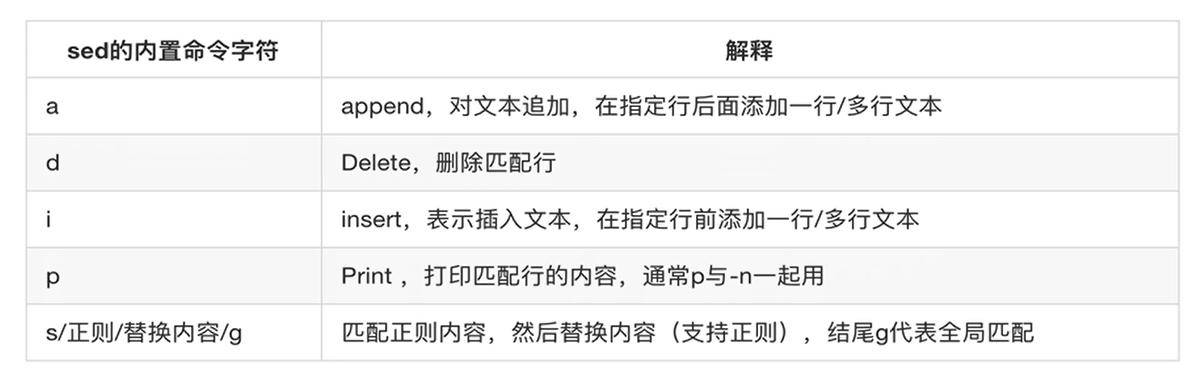
Summary
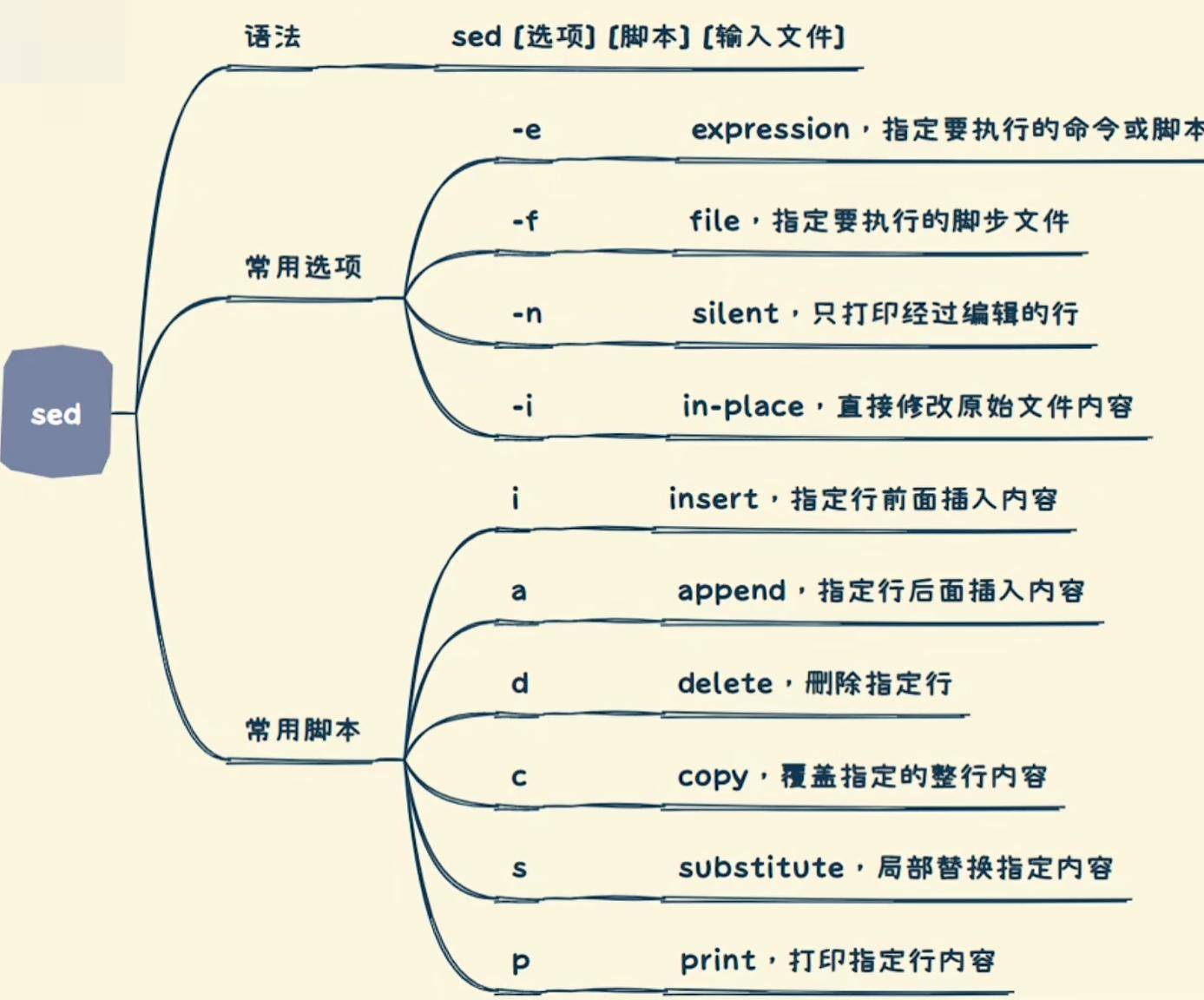
Additional sed Notes (Using Regular Expressions)
The address portion of a sed expression can use regular expressions to match lines, and process the lines that match successfully.
sed -renables extended regular expressions.
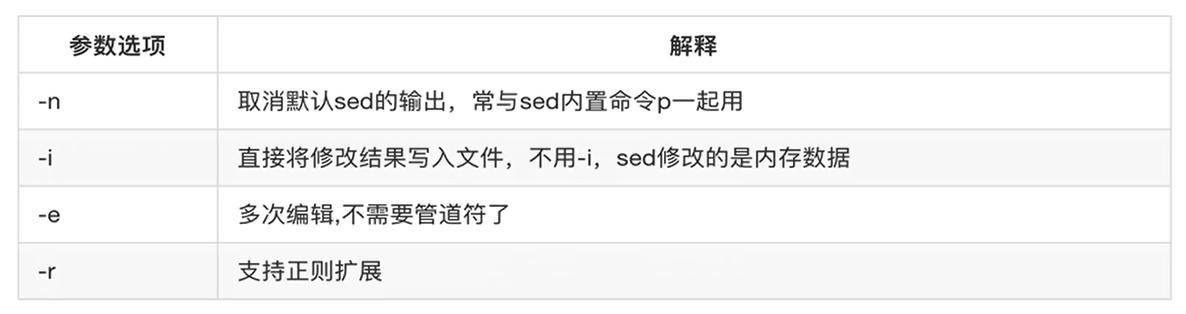
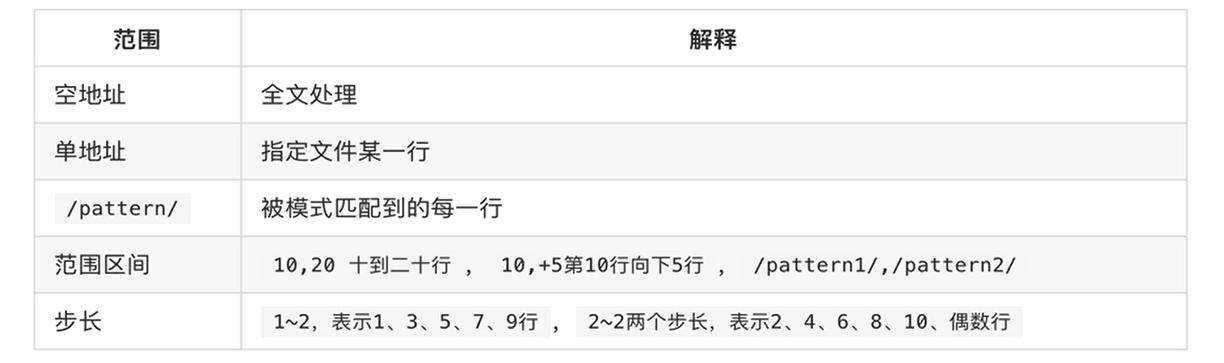
grep
The Linux
grep(global regular expression) command is used to search files or piped data streams for strings or regular expressions that meet specified criteria.
Syntax
grep [options] pattern [files]
或
grep [-abcEFGhHilLnqrsvVwxy][-A<显示行数>][-B<显示列数>][-C<显示列数>][-d<进行动作>][-e<范本样式>][-f<范本文件>][--help][范本样式][文件或目录...]
- pattern - The string or regular expression to search for.
- files - The names of the files to search. Multiple files can be searched at the same time. If the files parameter is omitted, data is read from standard input by default.
Common options::
-E: Enable extended regular expressions extend-o: Show only the matching strings themselves only-i: Match while ignoring case ignore-v: Search in reverse; print only lines that do not match-n: Show the line numbers of matching lines number-c: Print the number of matching lines
Grouping syntax ()
Bundle multiple characters together and process them as a single unit.
(was|ad) (grouping) matches either was or wad
(was).*\1 (reuse) \1 references the first group again
awk
awk was originally named gawk. It is usually used for processing text formats, but it is actually a programming language too (Crazzy!).
Basics
awk syntax:
awk	options	parttern {action} file
    参数		模式		动作
Field references:
$0: Represents the entire line of text.$1: Represents the first field.$2: Represents the second field, and so on.$NF: Represents the last column.
In awk, fields are separated by the field separator. By default, awk uses spaces or tabs as field separators, but you can specify a different separator by setting the FS variable.
awk '{ print $1, $2, $3 }' data.txt
# 打印每一行的第一列 第二列 第三列。
awk 'BEGIN {FS = ","} {print $2}' test
# 指定以逗号分隔字段。
exmaple
# ens33 的ipv4地址
ip addr show ens33 | awk 'NR==4 {print $2}' | awk 'BEGIN {FS="/"} {print $1}'
192.168.6.66

# ens33 的ipv4地址 (正则方式)
ip addr show ens33 | awk '/inet / {print $2}' | awk 'BEGIN {FS="/"} {print $1}'
192.168.6.66

# 所有的ipv4地址
ip addr | awk '/inet / {print $2}' | awk 'BEGIN {FS="/"} {print $1}'
127.0.0.1
192.168.6.66
172.17.0.1

# 所有的ip地址
ip addr | awk '/inet/ {print $1": "$2}' | awk 'BEGIN {FS="/"} {print $1}'
inet: 127.0.0.1
inet6: ::1
inet: 192.168.6.66
inet6: fe80::20c:29ff:fed8:bcf0
inet: 172.17.0.1