
MySQL Study Notes
A comprehensive guide to MySQL database management and operations, covering SQL statement categories, database and table operations, indexes, storage engines, and performance optimization. It spans everything from basic usage to advanced optimization, with a focus on index data structures, types, usage, and optimization techniques to help readers understand and improve database performance.
MySQL
SQL Statement Categories
ddl defination
dml managment
dql query
dcl control
1. Database-related
-- 显示所有数据库
show databases;
-- 创建数据库
create database test;
-- 创建数据库 指定默认字符集和默认排序规则
create database test default character set utf8mb4 collate utf8mb4_unicode_ci;
-- 删除数据库
drop database test;
-- 选择使用数据库
use test;
2. Tables
-- 创建表
create table test(
    column_name column_type comment 'comment',
    ....
);


-- 修改字段
alter table test
    change column column_name new_column_name new_column_type;
-- 修改字段 不包括字段名
alter table test
    modify column column_name new_column_type;
-- 修改字段 增加列
ALTER TABLE employees
    ADD COLUMN birth_date DATE;
-- 修改字段 删除列
ALTER TABLE employees
    DROP COLUMN birth_date;
-- 修改表名
ALTER TABLE employees
    RENAME TO staff;

-- 删除表
drop table test;

-- 展示选择的库的全部表
show tables;

-- 主键,外键
ALTER TABLE employees
    ADD PRIMARY KEY (employee_id);

ALTER TABLE orders
    ADD CONSTRAINT fk_customer
    FOREIGN KEY (customer_id)
    REFERENCES customers (customer_id);
3. Data-Related
-- 插入数据
insert into test values(...),(...);
-- 指定字段插入多条数据
insert into test(columns...) values(...),(...);
-- 查询表的所有数据
select * from test;
-- 查询表的所有符合条件的数据
select * from test where (colum > [< = <= >= not in(..)]);
-- 使用聚合函数查询
select count()[max min avg] from test where ...;
-- 使用聚合函数 分组查询
select count()[max min avg] from test where ... group by cloumn_name having [condition];
-- 排序
select * from test order by column1 desc col;
4. User Permissions
-- 创建本地用户
create user 'test'@'localhost' identified by '123456';
-- 创建可以外部访问的用户
create user 'wds'@'%' identified by '123456';
-- 修改用户密码
alter user 'wds'@'%' identified with mysql_native_password by '1234';

-- 展示某个所有权限
show grants for 'wds'@'%';
-- 授予用户权限
grant all on test.* to 'wds'@'%';
-- 移除用户权限
revoke all on test.* from 'wds'@'%';
5. Functions
# str
-- 字符拼接
concat('str1','str2')
-- 字符小写
lower('str')
-- 字符大写
upper('str')
-- 字符左填充
lpad('str',spill_length,'spill str')
-- 字符右填充
rpad('str',spill_length,'spill str')
-- 字符去除空白
trim('  str  ')
-- 分割字符串
substring(str, startindex1, length)


# number
-- 向下取整
ceil(1.1)  -> 2
-- 向上取整
floor(1.1) -> 1
-- 四舍五入
round('2.345', 2) -> 2.35
-- 求余
mod(3,4) -> 3
-- 随机数
rand()

# date
-- 当前时间
curdate()
-- 当前日期
curtime()
-- 当前时间和日期
now()

-- 获取日期的年月日
year(date)
month(date)
day(date)
-- 日期基础上加70天
date_add(now(),interval 70 day)
-- 计算两个日期相差多少天 date1 - date2
datediff(date1,date2)
6, Control Flow Functions
-- 如果condition为true返回第一个值,如果为false返回第二个值
if (condition,'ok','error')
-- 如果condition非null返回本身,如果为null返回第二个值
ifnull(condition,'Default')

-- 条件可换表达式
case workaddress when '北京' then '一线城市' when '上海' then '一线城市' else '二线城市'
7. Constraints
-- 非空约束
not null
-- 唯一约束
unique
-- 主键约束
primary key
-- 默认约束
default
-- 检查约束 (8.0.16+)
check
-- 外键约束
foreign key
    -- 约束 删除/更新行为
    -- NO ACTION 默认 RESTRICT 不允许有对应外键记录的记录更新/删除
    -- CASCADE 有对应外键记录的记录更新/删除 执行对应的 更新/删除
    -- SET NULL 有对应外键记录的记录删除时 设置为null(前提是允许设置为null)
    -- SET DEFAULT 有对应外键记录的记录删除时 对应列 设置为默认值(Innodb不支持)
alter table ? add constraint f_name reference table(foreignkey)
    on update CASCADE
    on delete CASCADE;
8. Multi-table Queries
-- 隐式内连接
select * from table1,table2 where conditions
-- 显式内连接
select * from table1 [inner] join table2 on  conditions
-- 左外连接 会包含全部左表的记录
left join
-- 右外连接 会包含全部右表的记录
right join
-- 自连接
-- 连接同一张表 (场景:员工表查询对应管理者,管理者信息也在员工表中)

-- 联合查询
-- 合并两次查询结果 不加all去除重复项 (查询的列数和类型要相同)
slect * from emp where age > 20
union [all]
slect * from emp where salary > 20k;

-- 子查询
    -- 标量子查询
    select * from emp where dept_id = (select id from dept where name = '销售部');
    select * from emp where entrydate > (select entrydate from emp where name = '方东白');

    -- 列子查询 可用操作符(in 、not in、any、some、all)
    select * from emp where dept_id in (select id from dept where name = '销售部' or name = '市场部');
    -- all 的用法 (都需要满足) any/some (满足一个)
    select * from emp where salary > all ( select salary from emp where dept_id =(select id from dept where name = '财务部') );

    -- 行子查询
    select * from emp where (salary,managerid) = (select salary, managerid from emp where name = '张无忌');

    -- 表子查询
    select * from emp where (job,salary) in ( select job, salary from emp where name = '鹿杖客' or name = '宋远桥' );
    select e.*, d.* from (select * from emp where entrydate > '2006-01-01') e left join dept d on e.dept_id = d.id ;
9. Storage Engines
MySQL Architecture
From top to bottom: (clients, various development SDKs), connection layer, service layer, engine layer (pluggable), storage layer
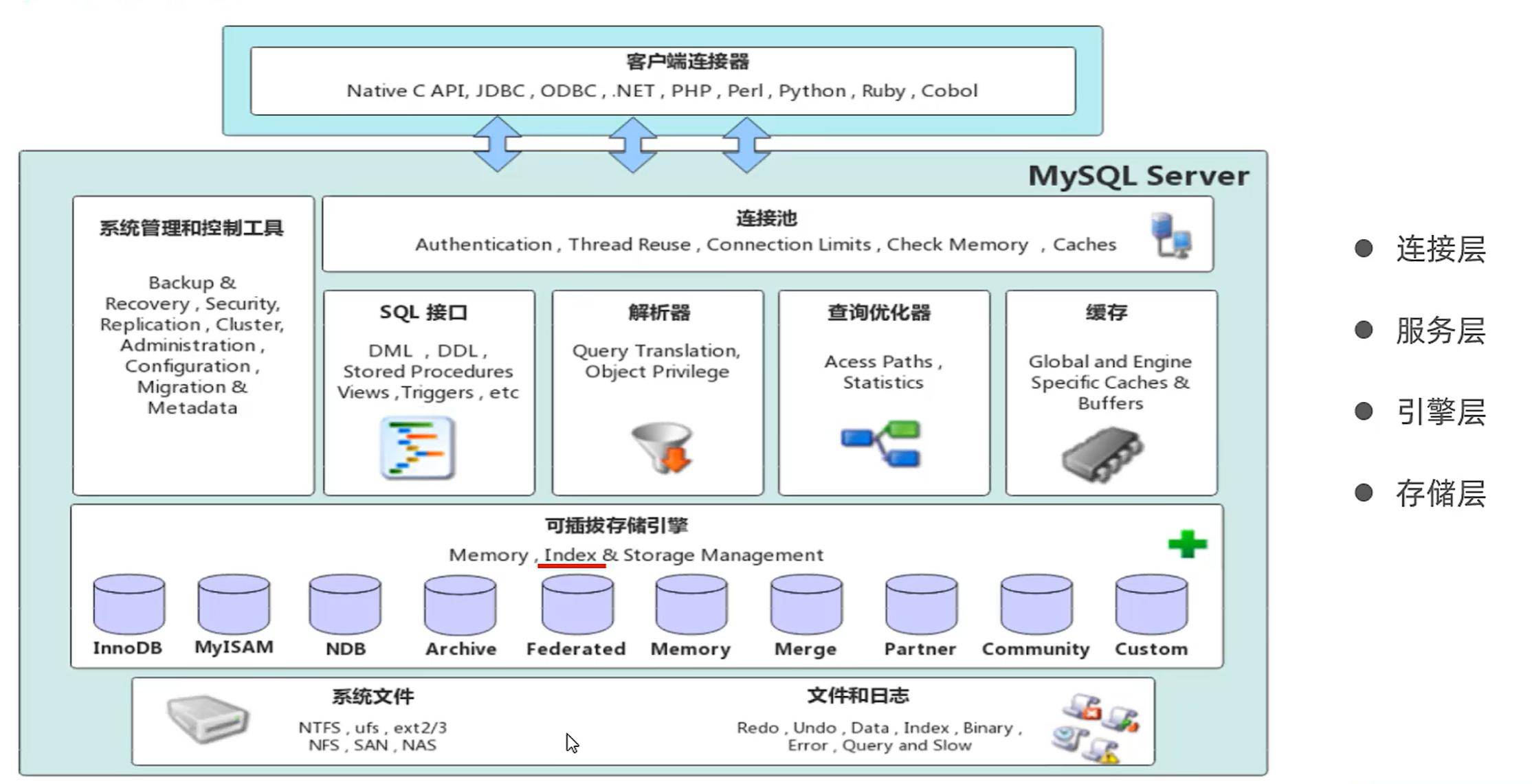
注意不同层实现的功能
Introduction to Engines
A storage engine is the implementation responsible for storing data, creating indexes, and updating/querying data.
There is no inherently good or bad storage engine; what matters is using the right one for the scenario.
# 查看表锁使用的引擎
show create table user;

CREATE TABLE `user` (
  `id` int(10) unsigned zerofill NOT NULL AUTO_INCREMENT,
  `name` varchar(255) DEFAULT NULL,
  `gender` varchar(255) DEFAULT NULL,
  PRIMARY KEY (`id`)
) ENGINE=InnoDB AUTO_INCREMENT=3 DEFAULT CHARSET=utf8mb4

# 在创建表的时候没有选择引擎,默认就innodb
# 从mysql5.5开始,innodb作为默认引擎,5.5之前默认是MyISAM
Storage engines are table-based, not database-based, so they are sometimes referred to as table types.
-- 查询数据库支持的存储引擎,以及各个引擎的特点。
SHOW ENGINES;
MySQL 5.7
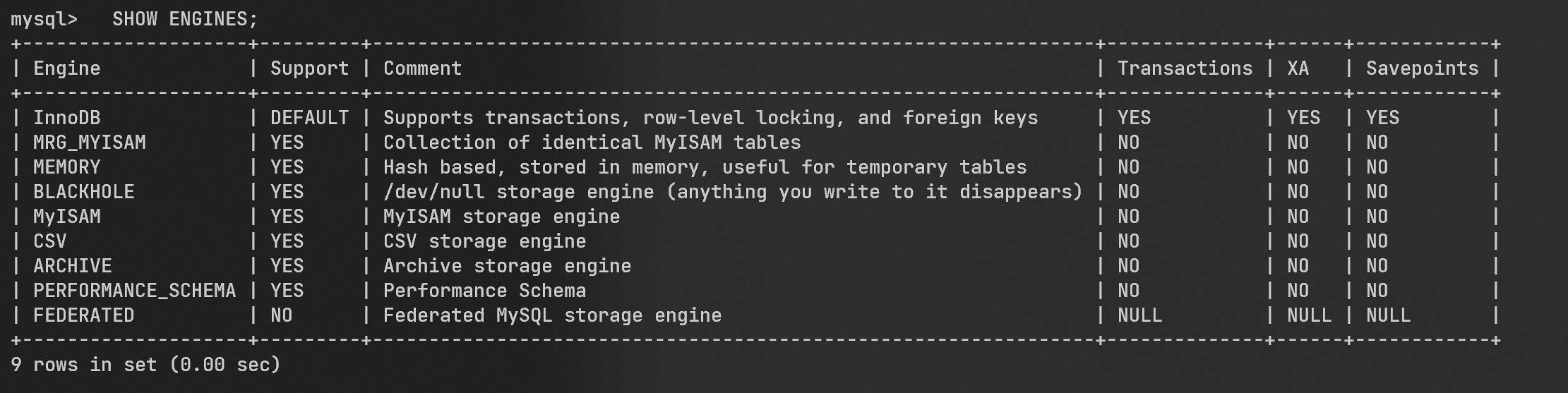
MySQL 8: Added two storage engines for primary-replica clusters
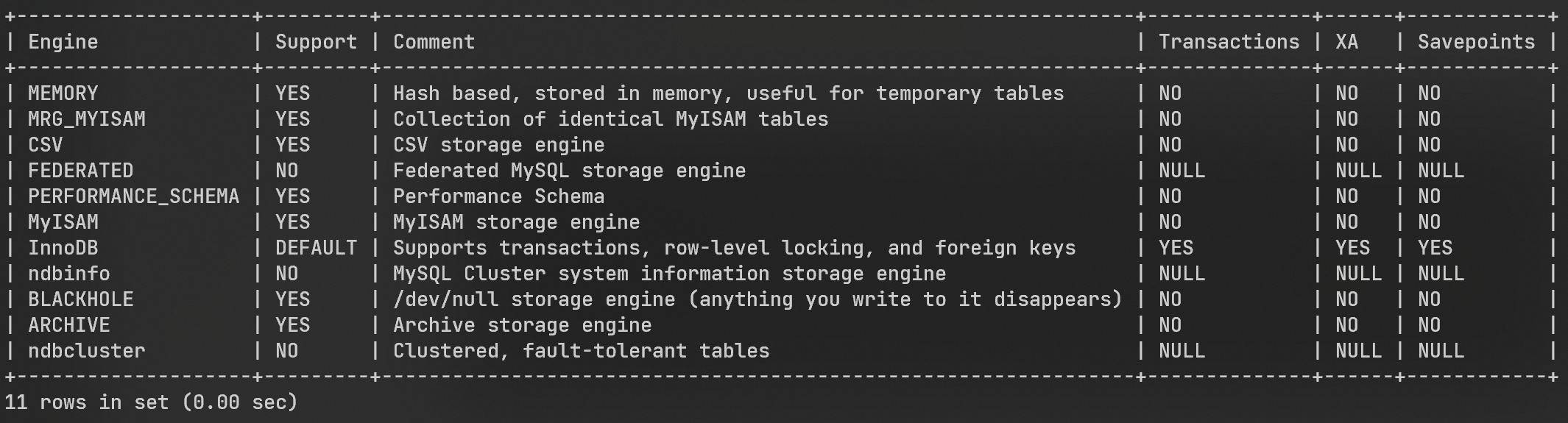
As shown in the figure, the storage engine determines support for features such as transactions, locks, and constraints. This is an important consideration when choosing an engine.
-- 创建表的时候指定存储引擎
CREATE TABLE test_myisam(
    id int,
    name varchar(10)
)ENGINE = MyISAM;

desc test_myisam;
show create table test_myisam;
InnoDB
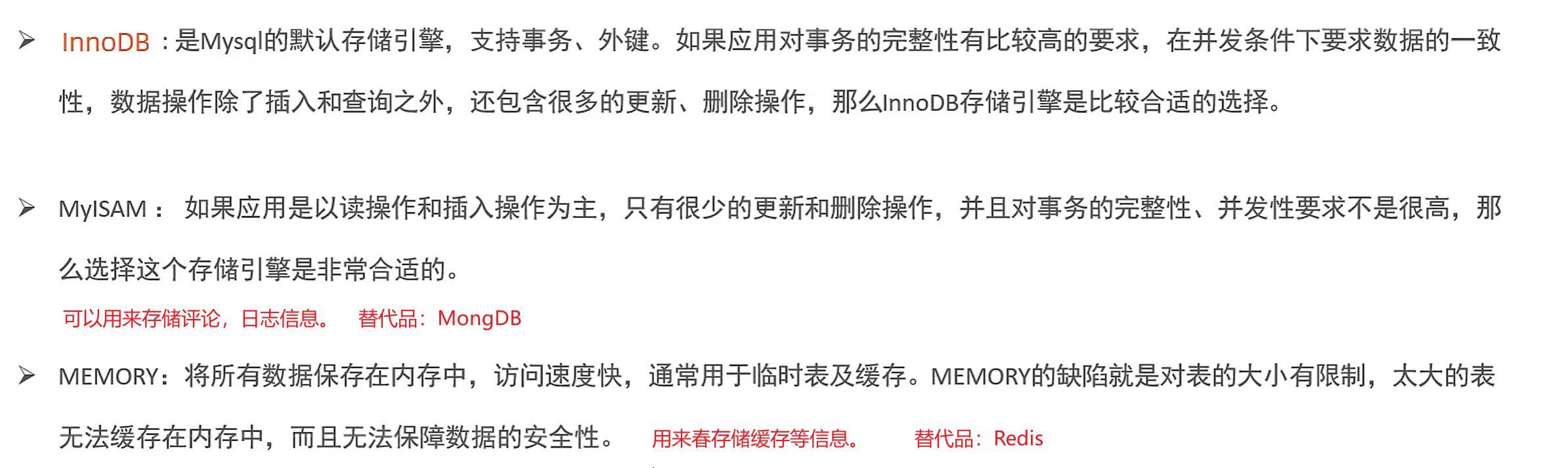
A general-purpose storage engine that combines high performance with high reliability
Features:
- DML operations follow ACID properties and support transactions;
- Row-level locking improves concurrent access performance;
- Supports foreign key constraints to ensure database integrity and correctness.
Storage format:
- The
idbfile type: one file per table, containing information such as the schema, data, and indexes; - Version 5 also has an
frmfile, which stores schema and index information.
The table structure, indexes, and data in the InnoDB engine consist of three parts. In early versions, the structure was stored in a separate file; later, it was merged into the
idbfile.Merge switch:
innodb_file_per_table(enabled by default)
# 查看mysql系统变量
show variables like 'innodb_file_per_table';
select @@innodb_file_per_table;
Advanced Operations
Extract the table structure SDI file from the IDB file.
# ibd2sdi命令从mysql8引入 对于5版本无法使用
ibd2sdi table.idb
Storage Structures
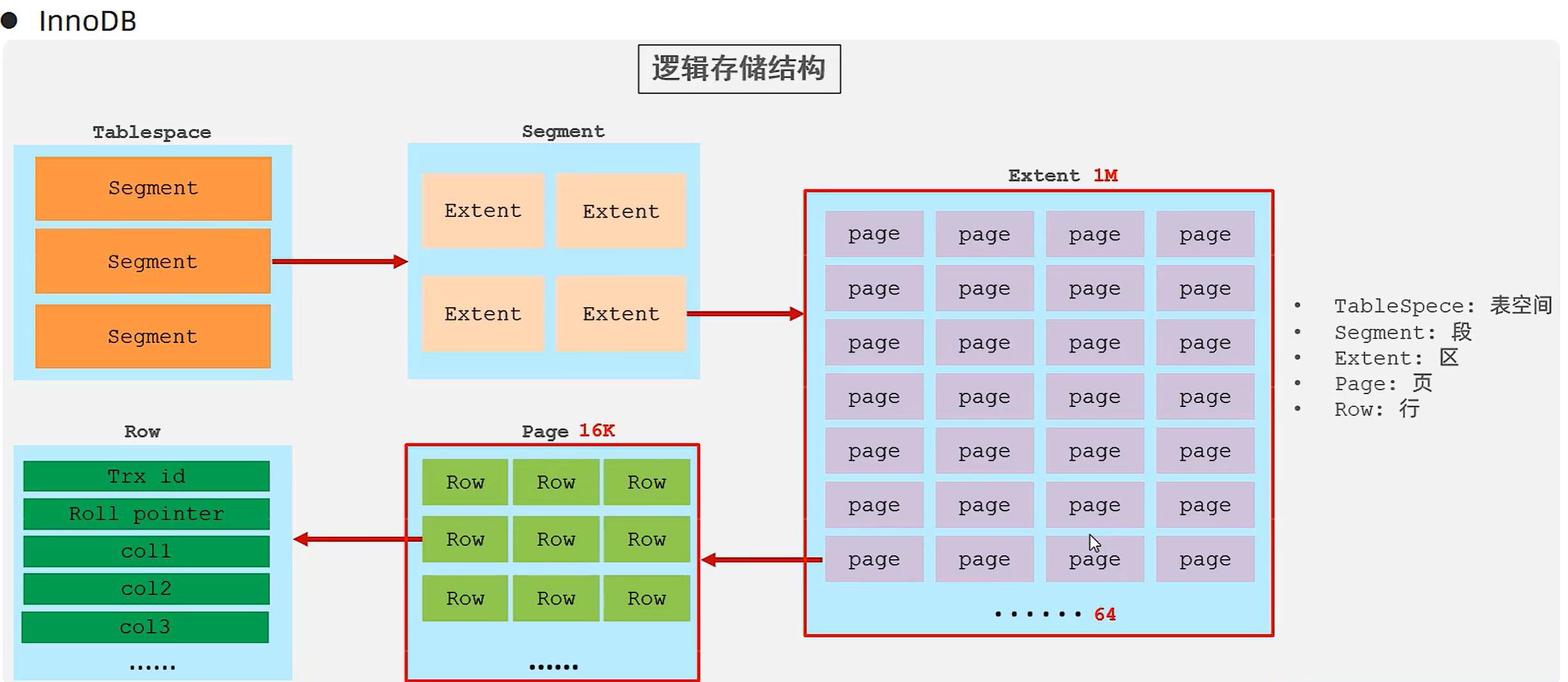
MyISAM
Default in older versions; high query performance
Features:
- Does not support transactions or foreign keys;
- Supports table locks, but not row locks;
- Fast access speed.
Storage formats:
- MYD structure;
- MYI data;
- sdi indexes.
Memory
Stored in memory; subject to hardware limitations, data is easily lost, and it can be used for temporary tables or caching
Features:
- Memory-based storage medium;
- Hash indexes.
Storage format:
- sdi index file.
How to Choose a Storage Engine
When choosing a storage engine, select one that suits the characteristics of the application system. For complex application systems, you can also combine multiple storage engines according to the actual requirements.
10. Indexes
An index is a data structure that helps MySQL retrieve data efficiently.
SQL optimization largely focuses on indexes, so they require particular attention.
Terminology:
- Full table scan (no index, or the index is not being used; lowest performance)
- Table lookup (after retrieving a value through a secondary index, continue the lookup in the clustered index to retrieve the record data)
Advantages and Disadvantages of Indexes

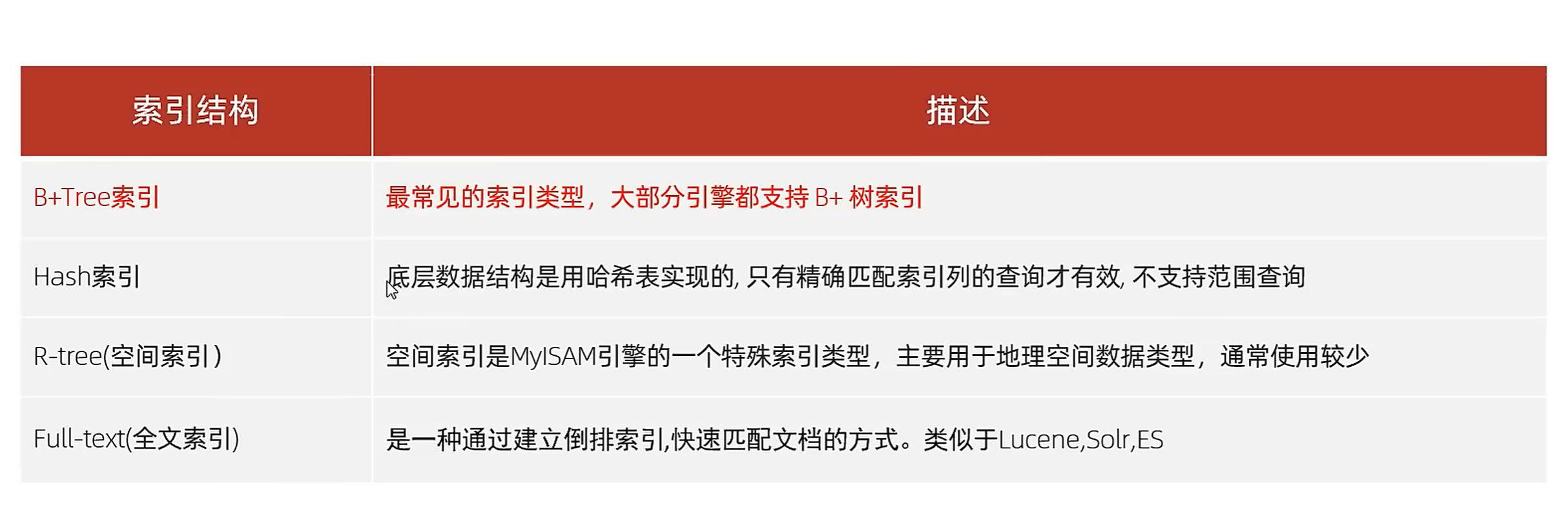
Index Data Structures
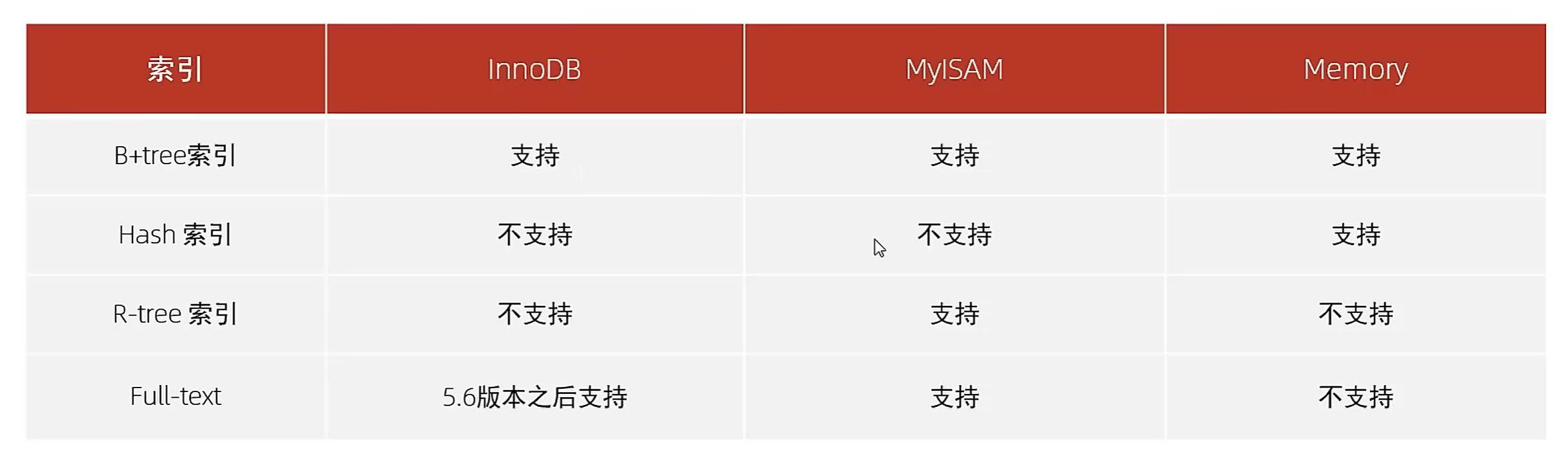
- MySQL indexes are implemented by storage engines, and different storage engines use different structures;
Comparing Data Structures
- Binary tree: Can become unbalanced, and ordered data can reduce performance; it can have only two child nodes, so when the amount of data is large, the tree becomes too deep and efficiency decreases.
- Balanced binary tree: Strictly balanced, with a high cost of maintaining balance.
- Red-black tree: Relatively balanced, with a comparatively lower maintenance cost; it is also a binary tree, so it has the same depth issue.
- B-tree (multiway balanced search tree): Data is distributed among nodes, making range queries inefficient.
- B+ tree: The internal nodes serve as indexes, while the leaf nodes store data. The data is arranged linearly in a singly linked list.
In B-trees and B+ trees, the order of a tree represents the maximum number of pointers each node can have.
B+ Tree Indexes in MySQL
In MySQL, the B+ tree has been optimized by adding pointers to the singly linked list of leaf nodes, turning it into a doubly linked circular list to improve range query performance.
Hash Indexes in MySQL
Hash indexes support only equality matching, not range queries, and cannot be used for sorting. They are also supported only by the Memory engine.
Why did MySQL’s InnoDB choose the B+ tree as its index data structure?
<img src="/api/file/e2cc65d7d45f4702bf6ea88711ea3808_0.7.jpg" alt="image-20240814210437339" style="zoom: 33%;" />
Index Categories
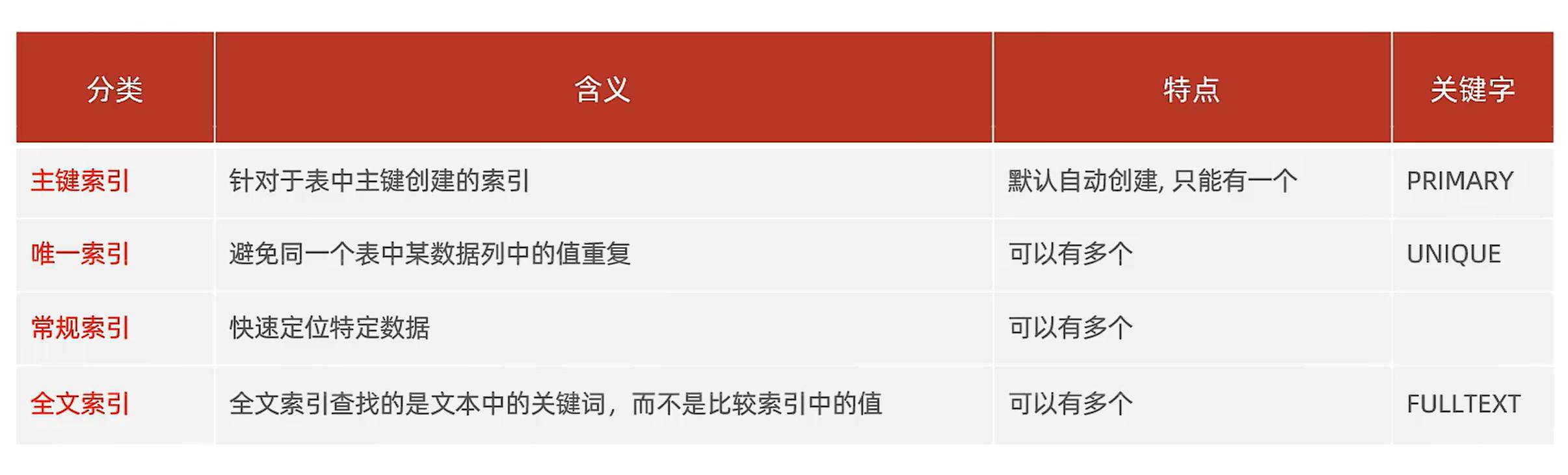

Only the clustered index stores data directly. Nonclustered indexes store the index values of the clustered index, so a lookup in the clustered index (a table lookup) is required to retrieve the actual data.
Index operations:
-- 创建索引
create [unique|fulltext] index index_name on table_name(index_col_name,...);
-- 查询表索引
SHOW INDEX FROM table_name;
-- 删除索引
DROP INDEX index_name ON table_name;
-- 查看系统状态信息
show global status like 'Com_______';

| Com_commit    | 11    |
| Com_delete    | 2     |
| Com_insert    | 17    |
| Com_select    | 22885 |
| Com_update    | 35    |

-- 通过分析结果可以得出系统是查询业务居多,还是更新业务居多,对于业务要分情况优化。
Slow Queries
- How to enable slow queries
slow_query_log=1   # 开启慢查询
long_query_time=2  # 慢查询时长
- How to view after enabling
/var/lib/mysql/localhost-slow.log
- Performance Analysis
select @@have_profiling;  	# 查看是否支持
set profiling = 1;			# 开启
select @@profiling;  		# 查看开启状态
show profiles;				# 查看每一条sql的耗时
show profile for {{query_id}};				# 查看每一条sql的耗时
show profile cpu for query {{query_id}};	# 查看每一条sql的耗时
Index Operations
show create drop ...
Preparation
CREATE TABLE `tb_user` (
  `id` bigint NOT NULL,
  `name` varchar(20) DEFAULT NULL,
  `phone` varchar(20) DEFAULT NULL,
  `perfession` varchar(20) DEFAULT NULL,
  `age` int DEFAULT NULL,
  `status` varchar(20) DEFAULT NULL,
  PRIMARY KEY (`id`),
  KEY `idx_user_name` (`name`)
)
View Table Indexes
show index from tb_user;
# 纵向展示
show index from tb_user \G;
Creating Index
Indexes are generally named as follows:
idx_table_name_index_name
# 创建一个常规索引
create index idx_user_name on tb_user(name);
# 创建一个唯一索引
create unique index idx_user_phone on tb_user(phone);
# 创建一个联合索引
create index idx_user_pro_age_sta on tb_user(profession, age, status);

# 也可以使用alter 语法添加索引
ALTER TABLE employees
ADD CONSTRAINT idx_email UNIQUE (email);
...
# 也可以创建表的时候添加索引
CREATE TABLE table_name (
  column1 data_type,
  column2 data_type,
  ...,
  CONSTRAINT index_name UNIQUE (column1 [ASC|DESC], column2 [ASC|DESC], ...)
);
...
Delete Index
drop index idx_user_email on tb_user;
Execution Frequency - Whether the Database Is Suitable for Optimization
Before optimizing a database, first clarify its business scenario:
For databases with many queries, consider optimization;
For databases with many modifications, consider not optimizing.
How can you tell whether a database has more queries or more inserts, deletes, and updates?
mysql> show global status like 'Com_______';
+---------------+-------+
| Variable_name | Value |
+---------------+-------+
| Com_binlog    | 0     |
| Com_commit    | 18    |
| Com_delete    | 10    |
| Com_insert    | 1235  |
| Com_repair    | 0     |
| Com_revoke    | 0     |
| Com_select    | 84244 |
| Com_signal    | 0     |
| Com_update    | 413   |
| Com_xa_end    | 0     |
+---------------+-------+
10 rows in set (0.05 sec)
Slow Query Log - How to Optimize
To optimize, we first need to be clear about what we want to optimize.
In MySQL, query performance is measured by execution time.
We need to find SQL statements that take a long time to execute (slow SQL) and then optimize them accordingly.
How do we find slow SQL?
Enable MySQL’s slow query log (disabled by default). SQL statements that exceed the specified execution time will be recorded in the log.
Check whether the slow query log is enabled
show variables like 'slow_query_log';
How to Enable the Slow Query Log
Method 1: Set a global variable (Setting is lost on restart)
Set the global variable slow_query_log to “ON”
set global slow_query_log='ON';
Set the Location for the Slow Query Log
set global slow_query_log_file='/usr/local/mysql/data/slow.log';
Log queries that take longer than 1 second.
set global long_query_time=1;
Method 2: Configure the settings in the configuration file (persistent)
Modify the my.cnf configuration file and add the following under [mysqld]:
[mysqld]
# slow_query_log = 1
slow_query_log = ON
slow_query_log_file = /usr/local/mysql/data/slow.log
long_query_time = 1
- Restart the MySQL service
service mysqld restart
Profiles - Slow SQL Isn't the Only SQL That Needs Optimization
SQL queries identified as slow generally need to be optimized. However, some simple queries may not appear in the logs even though they perform poorly, because they don't meet the slow SQL time threshold. In such cases, you need to manually check how long the SQL takes to execute.
Profile Details
Provides a rough breakdown of the time spent in each stage.
You can use SHOW PROFILES to see where the time spent executing a SQL statement went. However, this requires database support:
# 查看是否支持 测试 5.7.36 和 8.0.26 都支持
select @@have_profiling;
# 查看是否打开
select @@profiling;

# 使用方式:
# 对当前会话启用
set profiling = 1;
# 执行SQL
....
# 显示开启后的所有统计信息
show profiles

show profile for query query_id;
show profile cpu for query query_id;
Explian SQL Execution Plan
You can use explain to view the specific execution plan for an SQL statement.
# 使用方式
explian select count(*) from tb_sku;
desc select count(*) from tb_sku;
Execution Plan Field Explanations
- id: The order of execution. Items with the same id are executed from top to bottom; higher IDs are executed first.
- select_type: Query type
SIMPLESimple table query; no joins or subqueriesPRIMARYPrimary query, i.e., the outer queryUNIONThe second or subsequent query in a UNION operationSUBQUERYA subquery following SELECT or WHERE
- type: Join type (from best to worst performance, top to bottom)
NULLNo table is queriedsystemA system table is queriedconstA primary key or unique index is queriedeq_refUsually used only in MySQL join operationsrefA non-unique index is queriedrangeScans data within a specific rangeindexScans the index treeallScans the entire table
- possible_key: Indexes that may be used; there may be multiple
- key: The index actually used; NULL means no index was used
- key_len: Index length (in bytes); shorter is better, provided precision is unaffected
- rows: Estimated number of rows examined
- filtered: Percentage of rows returned out of the rows read (higher is better)
- Extra: Additional information
11. Using Indexes
How can we use indexes to improve the execution efficiency of our SQL?
Optimizing Conditional Queries
# id为主键索引 耗时极短
select * from tb_sku where id = 1 \G;
1 row in set (0.00 sec)
# 没有索引的情况 花费十八秒 非常慢
select * from tb_sku where sn = '100000003145001' \G;
1 row in set (18.37 sec)

# 为SN创建索引  在数据量非常大的情况下创建索引是非常耗时的
create unique index idx_sku_sn on tb_sku(sn);

# 再次查询,验证效果
select * from tb_sku where sn = '100000003145001' \G;
1 row in set (0.01 sec)
Index Failure Scenarios
1. The Leftmost Prefix Rule Is Not Satisfied
When a composite index is created, its columns have an order, and this order may cause the index to become ineffective.
Example:
| Table   | Non_unique | Key_name             | Seq_in_index | Column_name |
| tb_user |          1 | idx_user_pro_age_sta |            1 | profession  |
| tb_user |          1 | idx_user_pro_age_sta |            2 | age         |
| tb_user |          1 | idx_user_pro_age_sta |            3 | status      |
In this case, the leftmost field must be present for the adjacent fields to its right to use the index. This is called the leftmost prefix rule.
This rule states that when using a composite index for a query, the query conditions must start with the leftmost column of the index and cannot skip any columns.
age status not effective
profession status profession effective, status ineffective
profession effective
profession age effective
2 Range queries
Following the order of the index, if a field uses a greater-than or less-than range query, none of the fields to its right can use the index.
Workaround:
When permitted by the business requirements, use <= 或者 >=, which will not affect the index.
3 Using left-side or both-side fuzzy matching on an index
select * from tb_user where name like '%zhang';
select * from tb_user where name like '%zhang%';
When we use left-side or both-side fuzzy matching—that is, either like %xx or like %xx%—the index becomes ineffective.
4 Using Functions on Indexes
select * from tb_user where length(name)=6;
Because the index stores the original values of the indexed fields rather than values calculated by a function, it naturally cannot use the index.
5 Perform Expression Calculations on Indexes
explain select * from tb_user where id + 1 = 10;
Still because the index stores the original values of the indexed fields.
6 OR in the WHERE clause
This is because OR means that either of the two conditions can be satisfied. Therefore, having only one condition column indexed is meaningless; if any condition column is not indexed, a full table scan will be performed.
7 Quotes are not applicable to strings
select * from tb_user where phone = 17799990015;
8 For the Current Data Distribution, Not Using an Index Is Faster
Because a nonclustered index requires a lookup back to the table, using an index does not always improve query speed.
Therefore, MySQL may choose not to use an index in certain situations.
SQL Hints
When multiple indexes are available, MySQL’s optimizer decides which index to use. However, that index may not be the optimal choice. We can use SQL hints to tell the optimizer which index we want it to use.
# 提示MySQL使用或者不使用某个索引
select * from tb_user use index(idx_user_pro) where profession = '软件工程';
select * from tb_user ignore index(idx user pro) where profession = '软件工程";
However, there are also cases where MySQL does not use the index we recommend. If a manually specified index is not fast enough, MySQL will ignore the index hint.
# 强制使用某个索引
select * from tb_user force index(idx user pro) where profession = '软件工程";
Covering Index
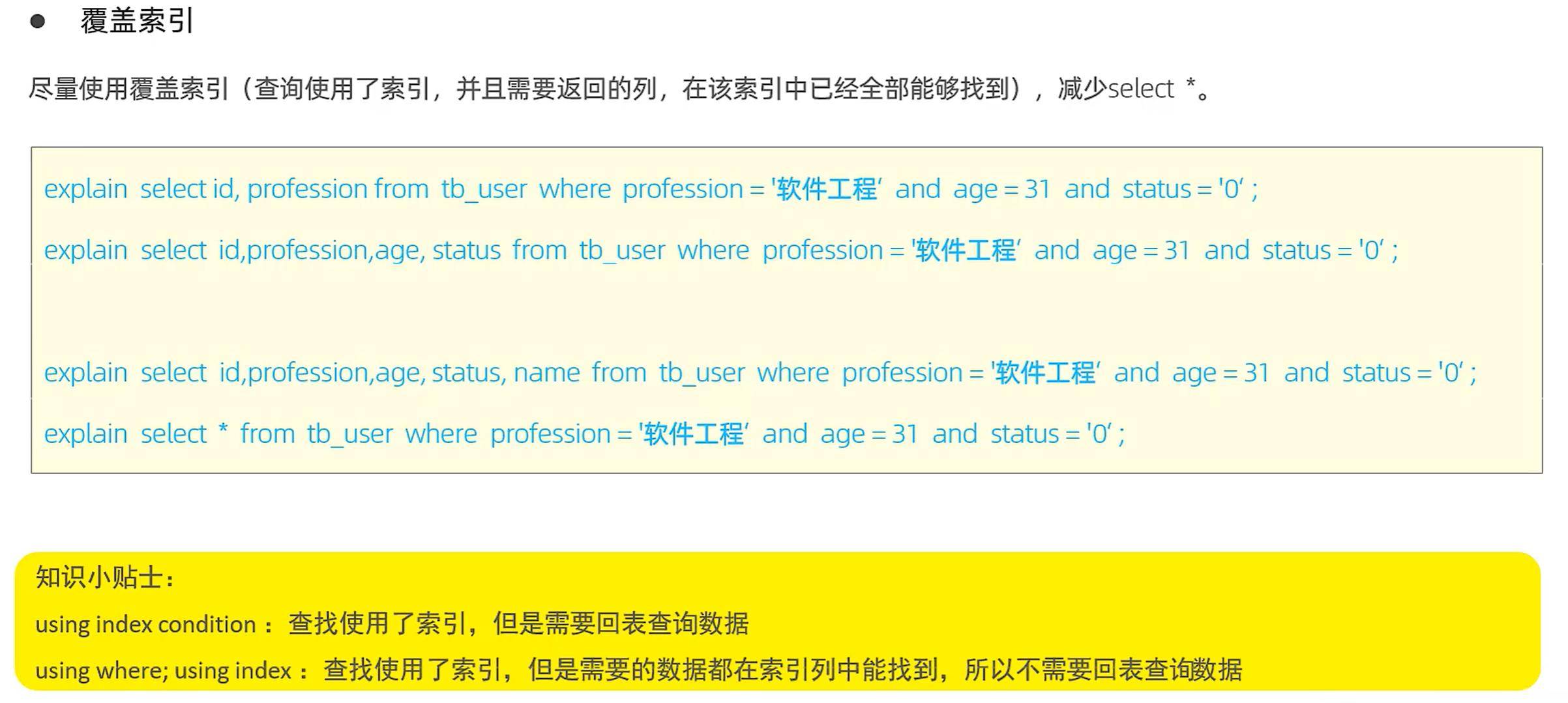
For a non-clustered index, the primary key is stored alongside the index values. If a query references no additional fields, the index alone can cover the result set, eliminating the need to access the table and providing very high performance.
Prefix Index
When creating an index on a field with a large data structure, indexing the entire field without truncation wastes substantial resources and reduces performance.
Solution:
# 只对前面多长度n的数据建立索引
create index idx_xxxx_on table_name(column(n));
Selectivity
Selectivity refers to the ratio of the number of distinct values in a table column to the total number of records in the table. If there are no duplicates, the ratio is 1, which provides the best performance.
When deciding how much data to index, consider the selectivity value and choose an appropriate length for the index.
Single-Column Indexes and Composite Indexes
A single-column index contains only one column.
A composite index contains multiple columns.
In business scenarios with multiple query conditions, when creating indexes for query fields, it is recommended to create a composite index rather than separate single-column indexes.
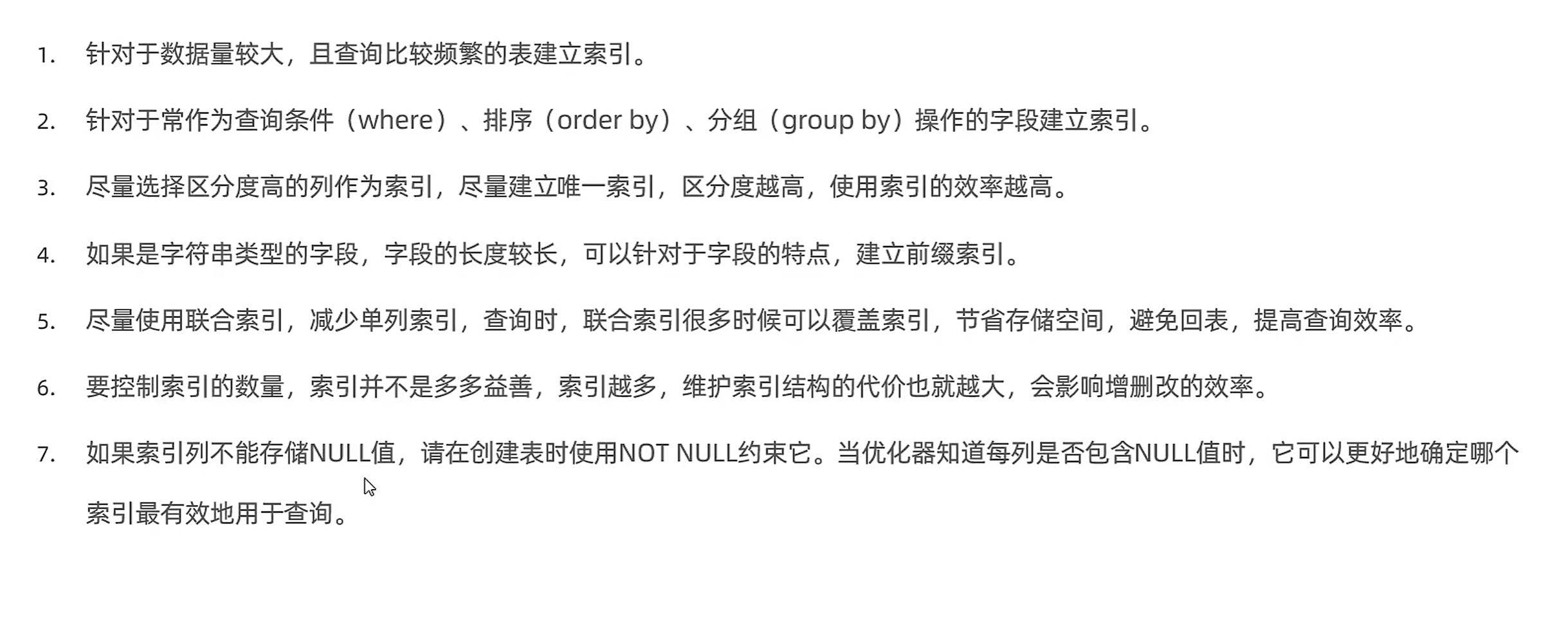
Index Design Principles
SQL Optimization
Optimizing Insert Operations
- Insert records in batches to reduce connection and transaction overhead.
- Commit transactions manually after executing multiple
INSERTstatements. - Insert records in primary-key order.
- Use the
LOADcommand to insert large amounts of data.
Loading Data from a File
The file here does not contain SQL data; its format is relatively flexible.
#客户端连接服务端时,加上参数-local-infile
mysql --local-infile -u root -p
#设置全局参数local_infile为1,开启从本地加载文件导入数据的开关
set global local_infile = 1;
#执行load指令将准备好的数据,加载到表结构中
load data local infile '/data_file' into table tb_user fields terminated by ',' lines terminated by '\n';
Primary Key Best Practices
Keep primary keys as short as possible while still meeting business requirements. (This reduces the space used by upper-level indexes in the B+Tree and lowers the frequency of page reorganization.)
When inserting data, favor sequential inserts and use an
AUTO_INCREMENTprimary key. (This avoids page reorganization.)Avoid using UUIDs or other natural keys, such as national ID numbers, as primary keys. (They may cause page reorganization.)
Avoid modifying primary keys during business operations. (This may cause page reorganization.)
ORDER BY Optimization
There are two types of sorting operations:
Using filesort: Scans the entire table, then sorts the rows one by one. (Avoid this whenever possible.)Using index: Returns rows directly in index order.
How to avoid filesort
- Create an appropriate index on the sort columns. For multi-column sorting, follow the leftmost-prefix rule.
- Use a covering index whenever possible.
- For multi-column sorting where one column is sorted in ascending order and another in descending order, pay attention to the rules for creating the composite index (
ASC/DESC). - If filesort cannot be avoided, you can increase the sort buffer size,
sort_buffer_size(256 KB by default), when sorting large amounts of data.
GROUP BY Optimization
As with conditional queries, adding a composite index is usually sufficient for GROUP BY.
Keep in mind:
- Indexes can improve efficiency during grouping.
- Index usage during grouping must also follow the leftmost-prefix rule.
LIMIT Optimization
When performing a paginated query such as LIMIT 2000000,10, MySQL must sort the first 2,000,010 records and return only records 2,000,000 through 2,000,010, discarding the rest. The cost of sorting and querying is very high.
Optimization approach: For paginated queries, creating a covering index can generally improve performance. You can optimize further by using a covering index with a subquery.
select * from tb_sku order by id limit 9000000,10;
10 rows in set (15.06 sec)

select * from tb_sku s,(select id from tb_sku order by id limit 9000000,10),temp where s.id = temp.id;
10 rows in set (11.83 sec)
Count Optimization
The MyISAM engine stores the record count separately, but you cannot add conditions.
InnoDB does not have this value.
In day-to-day use, queries usually include a logical-delete condition. As the amount of data grows, both engines become equally slow.
Solution:
Use Redis or another tool to maintain the count separately in a cache.
Performance comparison
count(field) < count(主键 id) < count(1) ≈ count(*),所以尽量使用 count(*)
update 优化
InnoDB row locks are applied to indexes, not records, and if the index cannot be used, the row lock is escalated to a table lock.
Therefore, we need to avoid cases where the query conditions have no index, to prevent table locks.