
Spring Security
Spring Security is a powerful security framework that provides authentication, authorization, and protection mechanisms. Based on the RBAC permission model, it implements user authentication and access control through interfaces such as Authentication and UserDetailsService. The framework supports custom authentication workflows and permission management, and provides mechanisms for handling authentication failures and insufficient permissions. It also addresses common security issues such as cross-origin requests and CSRF attacks, providing comprehensive protection for web applications.
Spring Security
PreAuthorize Pre-authorization
Authentication Authentication
Authority Authority
SecurityContext Context object; the Authentication object is stored in it
SecurityContextHolder Static utility class used to obtain the context object
Overview
Starter Dependency
After adding the starter dependency, Security is automatically enabled and a login page is generated.
        <dependency>
            <groupId>org.springframework.boot</groupId>
            <artifactId>spring-boot-starter-security</artifactId>
        </dependency>
Common Interfaces
Authentication interface: Its implementation class represents the user currently accessing the system and encapsulates user-related information.
AuthenticationManager interface: Defines methods for authenticating Authentication.
UserDetailsService interface: The core interface for loading user-specific data. It defines a method for retrieving user information by username.
UserDetails interface: Provides core user information. The user information retrieved by username through UserDetailsService must be encapsulated in a UserDetails object and returned. This information is then encapsulated in an Authentication object.
Filter Responsibility Chain

Permission Model
RBAC permission model (Role-Based Access Control), meaning role-based access control. This is currently the most commonly used permission model among developers, and is relatively easy to use and broadly applicable.
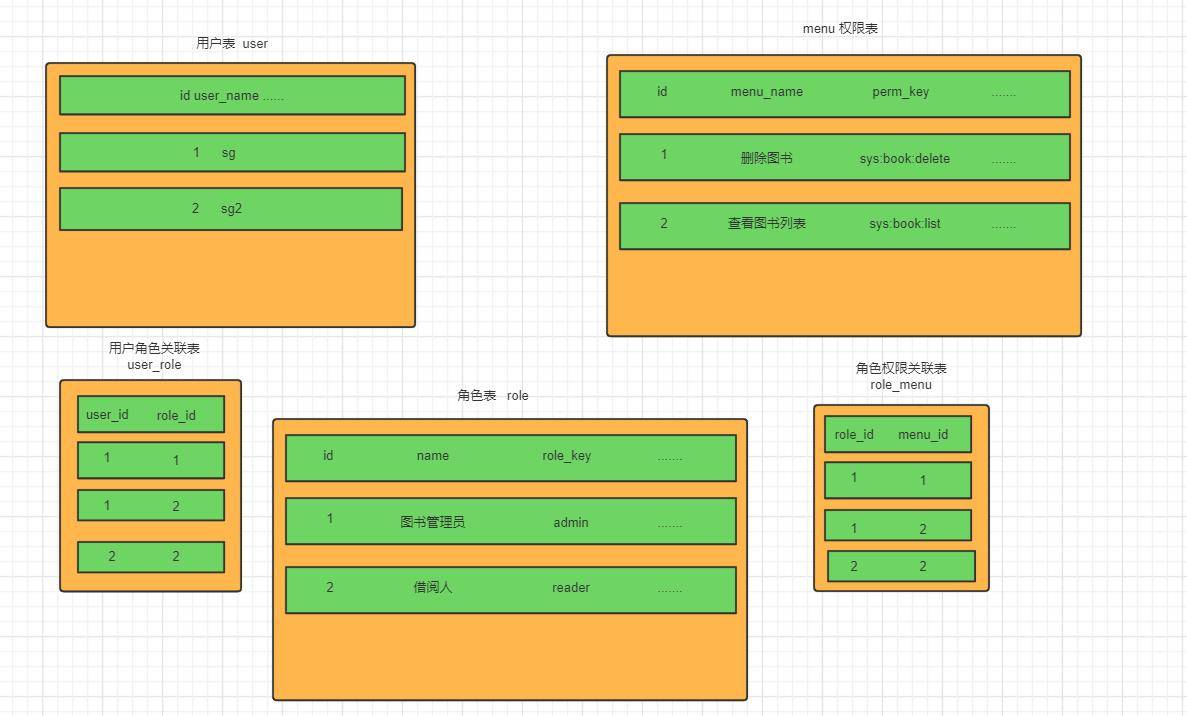
Create these 5 tables
# 移步 01.sql
Authentication
The process of determining whether a user is legitimate is called authentication.
Authorization
The process of determining whether a user has permission to perform a corresponding operation, and allowing or denying the operation, is called authorization.
Authorization Flow
When a request is made, it first passes through a custom filter (for example, JWTAuthenticationTokenFilter, which must execute before Spring Security’s filter for validating usernames and passwords). The filter parses the token to retrieve the user object, obtains the user’s permissions, wraps LoginUser and authorities in an authentication object, and sets it in SecurityContextHolder for Spring Security to manage.
Built-in Authorization Management
With built-in authorization management, store the
SimpleGrantedAuthoritypermission objects required by Spring Security inLoginUser.Then, use the
preAuthoresannotation to check withhasAuthoritywhether the user has permission to execute the corresponding method before entering the controller method.
Custom Authorization Management
Create a class to check whether the user has permission to execute an operation.
When writing a SpEL expression at the corresponding interface, use
@beanName.validationMethodto perform the check.You can also configure
antMatchersforhttpand specify the required permissions.
@PreAuthorize("@ex.hasAuthority('system:dept:list')")
Failure Scenarios
When authentication fails or insufficient permissions are encountered, the default behavior does not provide the frontend with an appropriate response. We need to override the default behavior with custom handling.
Handling Authentication and Authorization Failures
Spring Security provides two interfaces by default, AuthenticationEntryPoint and AccessDeniedHandler, along with two default implementation classes for handling authentication failures and insufficient permissions. To replace this behavior, simply implement these two interfaces manually and register them with the IoC container. Then inject these two objects into the Spring Security configuration class and set them using the corresponding methods in exceptionHandling() within the configure method.
Two implementation classes
@Component
public class AccessDeniedHandlerImpl implements AccessDeniedHandler {
    @Override
    public void handle(HttpServletRequest request,
                       HttpServletResponse response,
                       AccessDeniedException accessDeniedException) throws IOException, ServletException {

        R<String> unAuthorized = new R<>(HttpStatus.HTTP_FORBIDDEN, "权限不足,操作失败。", null);
        WebUtils.renderString(response, new ObjectMapper().writeValueAsString(unAuthorized));

    }
}

@Component
public class AuthenticationEntryPointImpl implements AuthenticationEntryPoint {
    @Override
    public void commence(HttpServletRequest request,
                         HttpServletResponse response,
                         AuthenticationException authException) throws IOException, ServletException {

        R<String> unAuthorized = new R<>(HttpStatus.HTTP_UNAUTHORIZED, "用户认证失败,请重新登录。", null);
        WebUtils.renderString(response, new ObjectMapper().writeValueAsString(unAuthorized));
    }
}
Configure in Spring Security
@Configuration
public class SecurityConfig extends WebSecurityConfigurerAdapter {
    //两个异常处理实现类
    @Autowired
    private AccessDeniedHandlerImpl accessDeniedHandler;
    @Autowired
    private AuthenticationEntryPointImpl authenticationEntryPoint;

    @Override
    protected void configure(HttpSecurity http) throws Exception {

        //添加认证失败 和 权限不足的异常处理
        http.exceptionHandling().authenticationEntryPoint(authenticationEntryPoint)
            .and()
            .exceptionHandling().accessDeniedHandler(accessDeniedHandler);
    }
}
Cross-Origin
Cross-origin refers to the restrictions the browser places on requests to different origins when the frontend sends a request (same origin: the domain name, protocol, and port number are identical). In projects where the frontend and backend are separated, they usually have different origins. To allow requests from different origins, Spring MVC and Spring Security must each be configured to permit cross-origin access.
Configure Spring MVC to allow cross-origin access
import org.springframework.context.annotation.Bean;
import org.springframework.context.annotation.Configuration;
import org.springframework.web.cors.CorsConfiguration;
import org.springframework.web.cors.UrlBasedCorsConfigurationSource;
import org.springframework.web.filter.CorsFilter;

@Configuration
public class MvcConfig {
    /*
     * 配置 MVC 允许跨域
     */
    @Bean
    public CorsFilter corsFilter() {
        UrlBasedCorsConfigurationSource source = new UrlBasedCorsConfigurationSource();
        CorsConfiguration corsConfiguration = new CorsConfiguration();
        corsConfiguration.addAllowedOrigin("*");
        corsConfiguration.addAllowedHeader("*");
        corsConfiguration.addAllowedMethod("*");
        source.registerCorsConfiguration("/**", corsConfiguration);
        return new CorsFilter(source);
    }
}
Configure Security to allow cross-origin access
http.cors();
CSRF Attacks
CSRF cross-site request forgery
This refers to a user logging in to website A and then visiting a malicious website B. Website B can forge a request to access website A. The browser will include website A’s cookie with the request, allowing website B to successfully forge actions on behalf of the user.
How to prevent it
Generate a csrf_token and have the frontend include it in the request headers. Projects that separate the frontend and backend use tokens for authentication and are inherently immune to CSRF attacks.
Disable CSRF protection in the configuration
Spring Security enables CSRF protection by default. To prevent it from validating the csrf_token and causing requests to fail, you must manually disable CSRF protection.
http.csrf().disable();